Enter search terms
Build a crawl from business categories, services, and locations that match the market you want to explore.
Build local B2B lead lists from Google Maps: capture business details and phone numbers, enrich public website emails and social links, then export organised results with the BizXtract desktop app.
BizXtract is the public product brand. The current Windows application and license checkout may still display the legacy name “MapCrawler.”
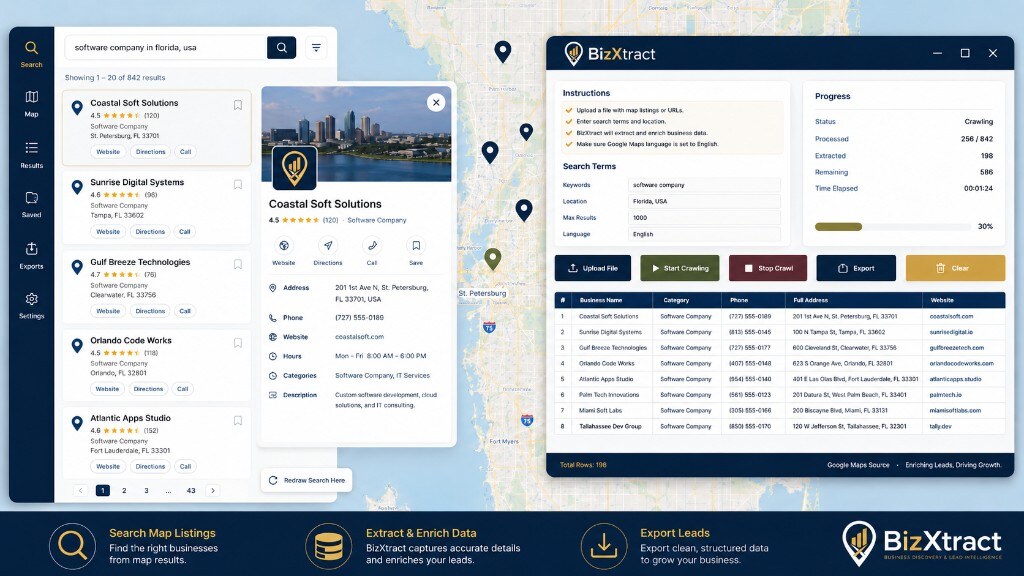
This AI-rendered product scene is based on the BizXtract desktop workflow: map discovery on one side, and the control panel, progress tracker, and export-ready records on the other.
BizXtract is not a generic contact database. You define the markets you want to research, the desktop app discovers relevant listings, and optional enrichment runs while each business is processed so the saved row is already useful.
Build a crawl from business categories, services, and locations that match the market you want to explore.
The Windows desktop app opens Google Maps, moves through result cards, and extracts supported listing information.
When enabled, BizXtract visits the listed website and looks for supported public email addresses and social-profile links.
Combined business and website information is placed into structured rows ready for review and export.
Availability varies by listing and website. BizXtract organises supported public information it can locate; it does not promise that every field exists for every business.
The current product focuses on controlled Windows desktop crawling for sales teams, agencies, local SEO researchers, and outbound list builders—without becoming an oversized CRM.
Process a sequence of business-and-location searches without rebuilding the crawl for every term.
Choose whether business websites should be inspected for public email and social links during the listing workflow.
Each processed business is added to the desktop result table with discovered listing and enrichment data kept together.
Move the organised lead rows into a portable export for research, qualification, sales operations, or compliant outreach.
Try the product within the available free usage limits before choosing a paid license plan.
The desktop app connects to the license server to activate and validate licensed access for the installed application.
The license server tracks free-tier usage and manages paid license activation. Exact limits and available license durations are shown on the checkout page.
During the current brand transition, the checkout page, license emails, and desktop application may use “MapCrawler License.” That is the license for the BizXtract desktop product.
Run the application within the available free usage limits and assess whether the collected lead structure fits your process.
Review the workflowPurchase an available license plan, activate it in the desktop app, and use the product within that plan’s terms and limits.
View license optionsNo. BizXtract is a desktop application for Windows and Mac. This website provides product information, free-tier and license services, and checkout for the desktop app.
No. Map listings are the discovery source, but optional website enrichment can inspect each available business website for supported public email addresses and social-profile links.
Where available on a listing, BizXtract can collect business name, category, phone number, street address and location context, website, opening hours, rating details, and a listing or map reference. Availability varies by listing.
No. Enrichment depends on whether the listing has a working website and whether that website publicly exposes a supported email or social link. BizXtract records what it can locate; it cannot create unavailable data.
Yes. BizXtract prepares structured lead rows in the desktop results table and supports portable export so you can move listing and website enrichment data into research, qualification, sales operations, or compliant outreach workflows.
BizXtract is available as a desktop application for Windows and Mac. A web version is not offered.
BizXtract is built for sales teams, agencies, local SEO researchers, and operators who need repeatable local-business lead lists with optional public email and social-link enrichment—without turning the tool into a full CRM.
No. BizXtract is an independent desktop tool and is not affiliated with, endorsed by, or sponsored by Google. Users are responsible for following applicable website terms, laws, and communication rules.
BizXtract is designed to organise publicly available business information. Users are responsible for complying with applicable website terms, privacy requirements, anti-spam and communication rules, and the laws of the regions where data is collected or used.
Start with the available free usage or choose a license plan for the BizXtract desktop application.